 WINDAGE ENGINE
Docs / Start
The sample game
WindageSample is a complete, deliberately dull first-person game that ships in the engine's repository and is built against the engine's public API only. It exists to prove that someone who did not write the engine can build with it, and it is the best place to see how any feature is meant to be used.
What is in it
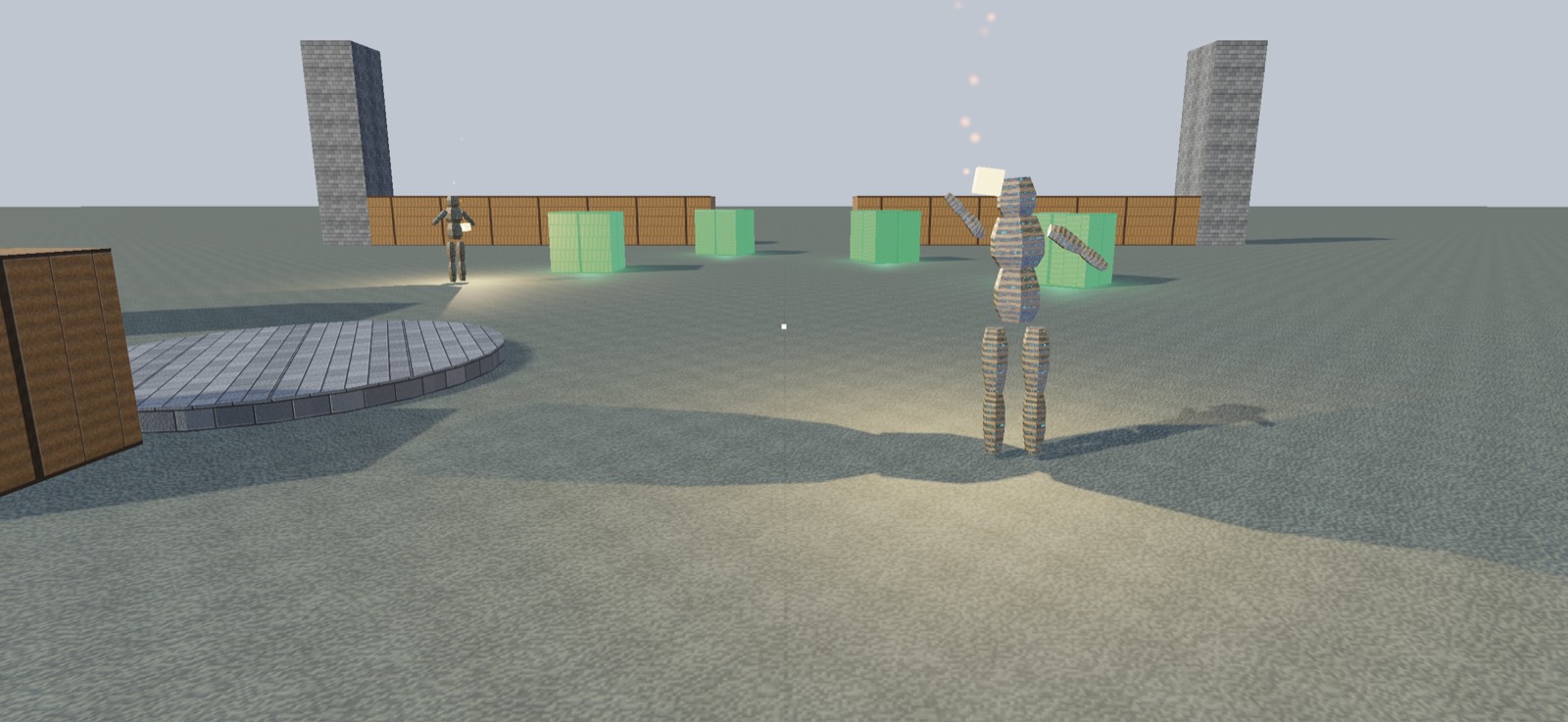
The game is a fetch quest: touch every marked crate before the clock runs out. Around that it carries everything a small game needs:
- Two levels, COURTYARD and RUINS, shipped as JSON files in
Sources/WindageSampleCore/Resources/and loaded withLevel.load(named:bundle:). They differ on purpose: a mesh the courtyard never uses, a different spawn, nine objectives against six, and a sun of their own. Winning moves you on to the next. - An editor, built on the engine's
LevelEditor, opened in place with Tab. - Sound: a pickup played at the crate, footsteps by surface, a brazier's crackle, all generated. With no output device the game runs quiet.
- A save: best times per level through
SaveStore, with a version field and a migration from the first format. - A settings screen for key and controller bindings, look sensitivity, dead zones, head bob and volume. It saves as you change it.
- Animated figures that wave as you come near, shadows, lamps, particles and instanced debris.
Run it
swift run WindageSample
No Xcode project, scheme or signing. The window opens on the engine's splash; any key skips it and still does what it was pressed for. The console prints which level file it loaded.
Once the editor has saved, its copy lives in Application Support and shadows the file in the repository, so editing courtyard.json appears to do nothing. The console line says so, and ⌘⌫ in the editor throws the copy away.
Controls
The movement keys come from the player's bindings, so the on-screen hints are read from them rather than typed in. These are the defaults:
| Key | Does |
|---|---|
| W A S D | move |
| Left Shift | sprint |
| Space | jump |
| C | crouch (slide when sprinting) |
| click / Esc | capture / release the mouse |
| O | settings |
| P | pause |
| R | restart the run |
| N | next level |
| M | cycle tone mapping: clamp, Reinhard, ACES |
| Tab | in and out of the editor |
With a controller connected, the left stick moves, the right stick looks and the menu button opens settings.
In the editor: aim and click (or Space) to pick, arrows move, Q/E up and down, A/D turn, -/= scale, B copy, ⌫ delete, L lamp on and off, [ ] lamp height, , . lamp brightness, T choose a kind, I add one where the crosshair meets the ground, ⌘S save, ⌘Z undo, ⌘R redo, ⌘⌫ revert to the shipped level.
Environment variables
The sample reads its options from the environment, so a check or a screenshot can be repeated exactly.
| Variable | Effect |
|---|---|
WINDAGE_SAMPLE_LEVEL=1 | start on that level: 0 courtyard, 1 ruins |
WINDAGE_SAMPLE_CAMERA=x,y,z,yaw,pitch | start the camera there (degrees) and fly instead of walk |
WINDAGE_SAMPLE_WALK="d:0.7 w:1.0 wait:1" | play a script of keys and seconds through the keyboard's own path; yaw: and pitch: turn the view |
WINDAGE_SAMPLE_RATE=60 | simulation steps per second; default 120 |
WINDAGE_SAMPLE_CHECK=1 | run as a check: no window shown, no keyboard, no sound, saves of its own |
WINDAGE_SAMPLE_FRAME=<path> | draw one frame to a PNG and quit |
WINDAGE_SAMPLE_SPLASH=1 or 0 | show or hide the splash; by default it is off in a check or a frame |
WINDAGE_SAMPLE_SILENT=1 | run with no audio engine at all |
WINDAGE_SAMPLE_FPS=1 | print frames and steps per second, and the longest wait between steps |
WINDAGE_SAMPLE_CHARACTER=/path/Name | load a rig from Name.usdc, its clips from Name_*.usdc beside it |
WINDAGE_SAMPLE_MEASURE_AUDIO=1 | render the brazier's crackle offline, print its level at distances, quit |
A scripted walk prints where the feet ended each segment, which is what Tools/walks.py checks against its records. See walks and frames.
How the code is split
The sample is three targets, and this is the shape the engine recommends for any game:
| Target | Holds |
|---|---|
WindageSampleCore | the logic that needs no window: SampleRun (the clock, objectives, pause, win and lose, the save format), SampleLevel (which level files exist and where an edited copy lives), SampleRubble, and the level files themselves |
WindageSampleCoreTests | tests against the core, run by swift test with nothing launched |
WindageSample | the app: main.swift (window, view, renderer) and SampleGame, the GameLoop that draws, plays sound and turns keys into calls on the core |
A win condition, a clock, a pause and a save fail quietly, and none of them need a drawable, so in the core they run in swift test in milliseconds. The split has paid for itself: parallel tests found SampleRun keeping progress in one shared static store. The store is injected now, which is also what save slots need.
SampleRun.step also returns what happened as a value instead of calling back, so nothing mutates the run mid-step.
To start your own, see Your first game.